Wednesday, 12 April 2017

HTML Text Formatting | HTML Formatting Elements

Text Formatting

This text is bold
This text is italic
This is subscript and superscript


HTML Formatting Elements

In the previous chapter, you learned about the HTML style attribute.
HTML also defines special elements for defining text with a special meaning.
HTML uses elements like <b> and <i> for formatting output, like bold or italic text.
Formatting elements were designed to display special types of text:
  • <b> - Bold text
  • <strong> - Important text
  • <i> - Italic text
  • <em> - Emphasized text
  • <mark> - Marked text
  • <small> - Small text
  • <del> - Deleted text
  • <ins> - Inserted text
  • <sub> - Subscript text
  • <sup> - Superscript text
HTML <b> and <strong> Elements
The HTML <b> element defines bold text, without any extra importance.

Example
<b>This text is bold</b>

The HTML <strong> element defines strong text, with added semantic "strong" importance.

Example
<strong>This text is strong</strong>

HTML <i> and <em> Elements
The HTML <i> element defines italic text, without any extra importance.

Example
<i>This text is italic</i>

The HTML <em> element defines emphasized text, with added semantic importance.

Example
<em>This text is emphasized</em>

HTML <small> Element
The HTML <small> element defines smaller text:

Example
<h2>HTML <small>Small</small> Formatting</h2>

HTML <mark> Element
The HTML <mark> element defines marked or highlighted text:

Example
<h2>HTML <mark>Marked</mark> Formatting</h2>

HTML <del> Element
The HTML <del> element defines deleted (removed) text.

Example
<p>My favorite color is <del>blue</del> red.</p>

HTML <ins> Element
The HTML <ins> element defines inserted (added) text.

Example
<p>My favorite <ins>color</ins> is red.</p>

HTML <sub> Element
The HTML <sub> element defines subscripted text.

Example
<p>This is <sub>subscripted</sub> text.</p>

HTML <sup> Element
The HTML <sup> element defines superscripted text.

Example
<p>This is <sup>superscripted</sup> text.</p>


HTML Text Formatting Elements
Tag Description
<b> Defines bold text
<em> Defines emphasized text 
<i> Defines italic text
<small> Defines smaller text
<strong> Defines important text
<sub> Defines subscripted text
<sup> Defines superscripted text
<ins> Defines inserted text
<del> Defines deleted text
<mark> Defines marked/highlighted text


Data Source: www.w3schools.com

Monday, 20 March 2017

HTML Paragraphs Tags | Pagargraph Tags in HTML

HTML Paragraphs


The HTML <p> element defines a paragraph:

Example
<p>MY First paragraph.</p>
<p>MY Second paragraph.</p>
<p>MY Thrid paragraph.</p>

HTML Paragraphs Tags | Pagargraph Tags in HTML


HTML Display
You cannot be sure how HTML will be displayed.

Large or small screens, and resized windows will create different results.

With HTML, you cannot change the output by adding extra spaces or extra lines in your HTML code.

The browser will remove any extra spaces and extra lines when the page is displayed:

Example
<p>
This paragraph
contains a lot of lines
in the source code,
but the browser 
ignores it.
</p>

<p>
This paragraph
contains         a lot of spaces
in the source         code,
but the        browser 
ignores it.
</p>

Don't Forget the End Tag
Most browsers will display HTML correctly even if you forget the end tag:

Example
<p>This is a paragraph.
<p>This is another paragraph.

HTML Line Breaks
The HTML <br> element defines a line break.

Use <br> if you want a line break (a new line) without starting a new paragraph:

Example
<p>This is<br>a paragraph<br>with line breaks.</p>

The Poem Problem
This poem will display on a single line:

Example
<p>
  My Bonnie lies over the ocean.

  My Bonnie lies over the sea.

  My Bonnie lies over the ocean.

  Oh, bring back my Bonnie to me.
</p>

The HTML <pre> Element
The HTML <pre> element defines preformatted text.

The text inside a <pre> element is displayed in a fixed-width font (usually Courier), and it preserves both spaces and line breaks:  Read More.....

Friday, 3 March 2017

The HTML Style Attribute | HTML Style

HTML Styles

The HTML Style Attribute


The HTML Style Attribute

Setting the style of an HTML element, can be done with the style attribute.
The HTML style attribute has the following 

syntax:<tagname style="property:value;">

The property is a CSS property. The value is a CSS value.

You will learn more about CSS later in this tutorial.

HTML Background Color
The background-color property defines the background color for an HTML element.

This example sets the background color for a page to powderblue:
Example

<body style="background-color:powderblue;">

<h1>This is a heading</h1>
<p>This is a paragraph.</p>

</body>

HTML Text Color

The color property defines the text color for an HTML element:

Example
<h1 style="color:blue;">This is a heading</h1>
<p style="color:red;">This is a paragraph.</p>

HTML Fonts

The font-family property defines the font to be used for an HTML element:

Example
<h1 style="font-family:verdana;">This is a heading</h1>
<p style="font-family:courier;">This is a paragraph.</p>

HTML Text Size
The font-size property defines the text size for an HTML element:

Example
<h1 style="font-size:300%;">This is a heading</h1>
<p style="font-size:160%;">This is a paragraph.</p>


Thursday, 2 March 2017

HtML Class Attribute | Use CSS through Classs Atribute

The HTML class attribute makes it possible to define equal styles for elements with the same class name.

Here we have three <div> elements that points to the same class name:

<!DOCTYPE html>
<html>
<head>
<style>
div.info {
    background-color: black;
    color: white;
    margin: 20px 0 20px 0;
    padding: 20px;
} 
</style>
</head>
<body>

<div class="info">
<h2>Leonardo Da Vinci</h2>
<p>His keen eye and quick mind led him to make important scientific discoveries, yet he never published his ideas. He was a vegetarian who loved animals and despised war, yet he worked as a military engineer to invent advanced and deadly weapons.</p>
</div>

<div class="info">
<h2>Nikola Tesla</h2>
<p>Inventor Nikola Tesla contributed to the development of the alternating-current electrical system that's widely used today and discovered the rotating magnetic field.</p>
</div>

Thursday, 3 November 2016

Database Connection in PHP | How to create connection in php with database

Database Connection in PHP


Php support many types of database like SQL,MySQL,Oracle and other Microsoft database such as ODBC etc.

To create a connection to database with the help of PHP.You must have a server installed locally or remotely.If you buy web hosting on the internet you must know the database host name and password to connect to the database you created on that server.

Or if you don't have such type hosting you can make your computer as a server for this you have to install the server on your local computer.

To know how to make your Computer as server Please Follow the Link below:


Sunday, 23 October 2016

Class in PHP | How create classes in PHP

Classes in PHP

Php Classes.Classes in Php is a new concept like C++.It covers the OOPs concept in PHP.OOPs stands for Object Oriented Programming.you can create classes in PHP like c++ with functions.

To do this:

<?php
class abc
{
function add1()
{
$a=10;
$b=20;
$c=$a+$b;
echo $c;
}
}
$obj=new abc;
$obj->add1();
?>

In the above PHP class example, we create a class with name "abc" also create function name "add1"
we declare two variable a and b and assign them value.Add them and assign the result to another variable c and show the result with echo command.

After this, we create an object of the class and call the function using that object. 

We can add multiple classes and functions in PHP.

<?php
class abc
{
function add1()
{
$a=10;
$b=20;
$c=$a+$b;
echo $c;
}
function mul()
{
$a=10;
$b=20;
$c=$a*$b;
echo $c;
}
}
$obj=new abc;
$obj->add1();
echo "</br>";
$obj->mul();

?>

PHP Class


Php Class
Php Class


Wednesday, 5 October 2016

What is PHP ? Full form of PHP

PHP

What is PHP?

1.PHP stands for Hypertext Preprocessor.
2.PHP is a server-side script.
3.PHP is executed by the browsers.
4.PHP is free service.

PHP is a server scripting language, and a powerful tool for making dynamic and interactive Web pages and websites.


PHP is a widely-used, free, and efficient language for website creation.


PHP file using .php extension for saving php files.

PHP Syntax:

Monday, 26 September 2016

HTML iframes tag | How to use html iframe tags in web page

HTML Iframe tags.

HTML iframe tags are used to display a web page within a web page.so, we can say that Html Iframe tags are used to display a web page as a part of another web page.

Html Iframe tag defined with <iframe> </iframe> tags within the body <body> </body> tag of web page.

Html Iframe Syntax:

<iframe src="url"></iframe>

"src" attribute defines the address or path of the iframe webpage

Saturday, 17 September 2016

Html Class | Class in Html | how to use class in html

Html Class: Html Class attribute is used to define styles for Html elements with the same class name.


how to use the class in HTML
you can use the Html class attribute to define the styles for elements for different elements with the same class name.
how to use the class in HTML

Html class Example:


1.Define Class style in head Section


<style>
.back{ background-color:red; }
</style>

Class attribute starts with .(dot) then use the Class name and define style for that Html class.

Tuesday, 6 September 2016

HTML List Tags:Ordered and Unordered lists style using CSS

HTML List tags are two types Ordered Lists and Unordered lists style.


<ul> and <ol> HTML list tags for HTML lists.Use Horizontal List For Menu.

HTML list tags are used to insert or create lists in the web page and website.There are two styles in HTML ordered lists and unordered lists.You can use HTML list tags to create Menu for your website.


HTML List Tags
HTML-List styles:
Ordered ListUnordered List
  1. One
  2. Two
  3. Three
  4. Four
  5. Five
  • One
  • Two
  • Three
  • Four
  • Five
An ordered HTML List tag starts with <ol> tag and every list item starts with <li> tag.Every item in order list starts with Number,Upper Alphabet,Lower Alphabet,Upper Roman,Lower Roman or without any mark.

Ordered List Tag Example:
<ol>
  <li>First</li>
  <li>Second</li>
  <li>Third</li>
</ol>

An Unordered HTML List tag starts with <ul> tag and every list item starts with <li> tag.Every item in order list starts with Bullet,Circle,Square or without any mark.

Ordered List Tag Example:
<ul>
  <li>First</li>
  <li>Second</li>
  <li>Third</li>
</ul>
HTML List Tags

Nested HTML List Tag

Saturday, 27 August 2016

HTML tables:How to create HTML Table in webpage and website

HTML TABLE


HTML Tables :We use HTML table <table></table> tag to define table in html webpage and website.The HTML table <table> tags also include sub table tags such as for define rows in HTML table we use <tr> tag, table  cell header is defined by <th> tag and <td> tag is used to define column or cell in HTML table.


All HTML table tags are given below:


<table>Table
<th>Table Cell header
<tr>Table Rows
<td>Table Cell or Column
<thead>Table Header
<tbody>Table Body
<tfoot>Table Footer
<caption>Table Caption

Note: <caption> tag must be put immediately after <table> start tag.


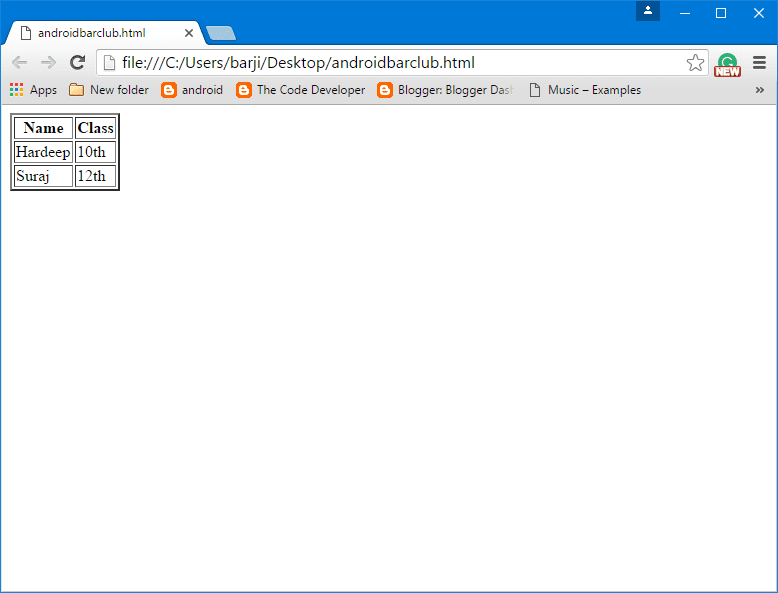
Create a simple table Example:


<table border="2px">
<tr>
   <th>Name</th><th>Class</th>
</tr>
<tr>
   <td>Hardeep</td><td>10th</td>
</tr>
<tr>
   <td>Suraj</td><td>12th</td>
</tr>
</table>

Html Table tag
Html Table tag

HTML Table Caption:


HTML table <caption> tag is used to add header or caption to a table.Adding a table caption is very useful  if there a lot's of tables in your web page or website.

Friday, 19 August 2016

HTML links color tag and properties|How to change HTML Links Color

HTML Link Colors:Active,Visited,Unvisited links types.


If you want to apply different colors for Active link, Visited links, On mouse over.We can do this by using CSS properties. Also, you can disable underline from links by CSS property.It makes the links more attractive and realistic.

If you don't want to change these properties the browser provide these default properties:-

1.Active Links show in Red color and underlined.

2.Unvisited Links show in Blue color and underlined.

3.Visited Links show in Purple color and underlined.

To change Link properties follow the below property:-

Friday, 12 August 2016

Background Image | Set Image as Background in HTML with CSS

"HTML Background Image" HTML Background images and colors.Use Image as background.


Insert in a web page or website using CSS/CSS3 help to make website/web page attractive.

1.Set or Add Background image or colors of your choice as Background in the HTML web page or website with the help of CSS/CSS3.

2.For this, you can use inline, Internal or External CSS as your comfortability.

3.We have these properties for Background setting:-
1.background-image
2.background-attachment
3.background-repeat
4.background-position

background-image property defines an image use as Background for your web page or website.

Example:

background-image: url("path");
background-attachment property is used to to make your

Wednesday, 3 August 2016

Comment in Html page or web pages source code|How to insert comments in html

Comment Tag in Html page or website source code.

Comment tags are  used to insert comments in the HTML.Comments are not displayed on the web pages on the browser.But this can help the developer or programmer when the developer has to modify HTML source code.Comments are also helped while testing HTML page because you can comment out HTML lines of code, one at a time, to search for errors.

You can add Comments in your HTML source code by using the following syntax:

<!-- Write or Insert Your Comment Here -->

We use an exclamation mark in the opening tag but not in the close tag.

Example:

<!-- Paragraph tag start -->
<p>This is Paragraph </p>
<!-- Paragraph tag end Here -->

You can also use comment tag directly into other HTML tags without using additional comment tags.
Example:

<!--p>This is Paragraph </p-->

Html Source code:

<!DOCTYPE html>
<html>
    <head>
          <title>Paragraph Tag </title>
    </head>
<body>
<!-- Heading Start -->
<h1> Heading1</h1>
<!-- heading end -->
<!--h2> Heading2</h2-->
</body>
</html>

Output here:-


Important Note: The text or things within the Comment tags will not be display on web pages.

Comment Below!

Thursday, 28 July 2016

How to add heading in HTML-HTML5 or heading tags in HTML or websites?

Here are the steps to include heading in HTML pages or web pages of your website :-

HTML-HTML5 headings added using heading tags from h1-h6.h1,h2,h3,h4,h5,h6 are HTML headings

Headings are most important part of any document.We start any article, paragraph after giving their heading.you can also give heading before writing any article or description in HTML or web page by using Heading tags.Headings are defined with <h1> to <h6> tag in a HTML.


<h1> to <h6> have variation in size and importance.<h1> tag have bigger font size and most importance among all headings.while <h6> tag have smaller font size and most least importance among all headings.

Example:
<h1> Heading1</h1>
<h2> Heading2</h2>
<h3> Heading3</h3>
<h4> Heading4</h4>
<h5> Heading5</h5>
<h6> Heading6</h6>

Headings also important because search engine uses the headings to index the structure and data/content of your web pages/website pages.Also, user explores or view your pages through a heading of your document or page.So, it is necessary to provide a good heading.

Example:
HTML heading tags example:

<!DOCTYPE html>
<html>
    <head>
          <title>Paragraph Tag </title>
    </head>
<body>
<h1> Heading1</h1>
<h2> Heading2</h2>
<h3> Heading3</h3>
<h4> Heading4</h4>
<h5> Heading5</h5>
<h6> Heading6</h6>
</body>
</html>
output:-

https://androidbarclub.blogspot.com/


Please comment below !

Saturday, 23 July 2016

How to apply CSS to any element for html page ?

Here i explain, what is CSS and how to use ?


What is CSS ?
CSS stands for Cascading Style Sheet. CSS is used to provide layout to html pages easy and efficiently.We can apply same CSS style to individual item or single page or multiple pages.
External CSS stylesheet can be apply to multiple pages.This is very helpful ,when you want same style for your website.

how to apply CSS?
we have syntax to apply CSS.
Syntax:element where have to apply{property:value;}

example: img { width: 200px; height: 200px;}

For apply CSS to any HTML element, we have to define CSS selector for particular HTML element.For these we have these selector.

1. Element selector 
This selector apply CSS to that HTML element that is define by Element.

Example: If we want to apply text color to paragraph using CSS.Follow these instructios:-
<style>
    p{color:red;}
</style>

2. Id selector 
This selector apply CSS to HTML element which is define with id attribute.

Example:If we want to apply text color to paragraph using CSS which is define by Id. Follow these instructios:-
<style>
    #par{color:red;}
</style>

3. Class selector 
This selector apply CSS to HTML element which is define with class attribute.

Example:If we want to apply text color to paragraph using CSS which is define by class. Follow these instructios:-
<style>
    .par{color:red;}
</style>

If you want to apply same CSS for different HTML elements,you can do this by following:-
Example:-
<style>
    h1,p{color:red;}
</style>

Thursday, 21 July 2016

HTML Paragraph Tag | Paragraph tag HTML is used to add Paragraph in web page website

HTML Paragraph Tag used to add paragraph in web page or website with properties


1.Paragraph tag is an HTML tag which is used to insert a paragraph.

2.Paragraph tag is start with start tag <p> and end with end tag </p>.Something typed or written in this tag shows as a paragraph on a web page.


3.Here are some elements used with paragraph tag like align(Left,Right,Justify) to set the location or format of a paragraph.


4.You can also use "<pre></pre>" tag for paragraph.This tag provides proper space between the word that makes paragraph easy to read and look neat and clean.In this tag when you press "Enter" after typing the first line and type the second line.so second line show after the first line without using break tag <br>.


Paragraph tag Example:


<!DOCTYPE html>

<html>

    <head>

          <title>Image Tag </title>

    </head>

<body>

<p>This is a paragraph with paragraph tag. </p>

<p>This is a muliple line paragraph with paragraph tag. 

This is a muliple line paragraph with paragraph tag.

This is a multiple line paragraph with the paragraph tag.

</p>

<pre>This is a multiple line paragraph with the paragraph tag. 

This is a multiple line paragraph with the paragraph tag.

This is a muliple line paragraph with paragraph tag.

</pre>

</body>

</html>

Paragraph tag
Paragraph tag

Please comment if you like it.THANKS