Showing posts with label Learn css and Learn css3. Show all posts

Saturday, 17 September 2016

Html Class | Class in Html | how to use class in html

Html Class: Html Class attribute is used to define styles for Html elements with the same class name.


how to use the class in HTML
you can use the Html class attribute to define the styles for elements for different elements with the same class name.
how to use the class in HTML

Html class Example:


1.Define Class style in head Section


<style>
.back{ background-color:red; }
</style>

Class attribute starts with .(dot) then use the Class name and define style for that Html class.

Tuesday, 6 September 2016

HTML List Tags:Ordered and Unordered lists style using CSS

HTML List tags are two types Ordered Lists and Unordered lists style.


<ul> and <ol> HTML list tags for HTML lists.Use Horizontal List For Menu.

HTML list tags are used to insert or create lists in the web page and website.There are two styles in HTML ordered lists and unordered lists.You can use HTML list tags to create Menu for your website.


HTML List Tags
HTML-List styles:
Ordered ListUnordered List
  1. One
  2. Two
  3. Three
  4. Four
  5. Five
  • One
  • Two
  • Three
  • Four
  • Five
An ordered HTML List tag starts with <ol> tag and every list item starts with <li> tag.Every item in order list starts with Number,Upper Alphabet,Lower Alphabet,Upper Roman,Lower Roman or without any mark.

Ordered List Tag Example:
<ol>
  <li>First</li>
  <li>Second</li>
  <li>Third</li>
</ol>

An Unordered HTML List tag starts with <ul> tag and every list item starts with <li> tag.Every item in order list starts with Bullet,Circle,Square or without any mark.

Ordered List Tag Example:
<ul>
  <li>First</li>
  <li>Second</li>
  <li>Third</li>
</ul>
HTML List Tags

Nested HTML List Tag

Saturday, 27 August 2016

HTML tables:How to create HTML Table in webpage and website

HTML TABLE


HTML Tables :We use HTML table <table></table> tag to define table in html webpage and website.The HTML table <table> tags also include sub table tags such as for define rows in HTML table we use <tr> tag, table  cell header is defined by <th> tag and <td> tag is used to define column or cell in HTML table.


All HTML table tags are given below:


<table>Table
<th>Table Cell header
<tr>Table Rows
<td>Table Cell or Column
<thead>Table Header
<tbody>Table Body
<tfoot>Table Footer
<caption>Table Caption

Note: <caption> tag must be put immediately after <table> start tag.


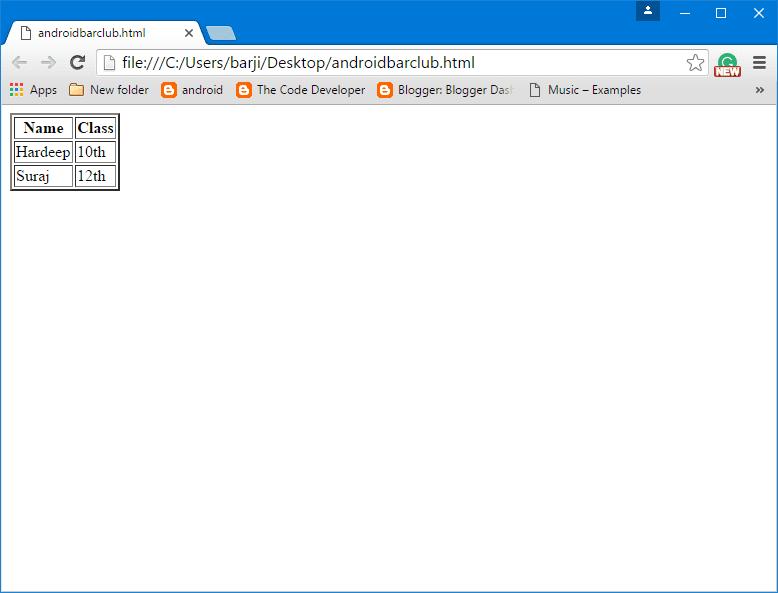
Create a simple table Example:


<table border="2px">
<tr>
   <th>Name</th><th>Class</th>
</tr>
<tr>
   <td>Hardeep</td><td>10th</td>
</tr>
<tr>
   <td>Suraj</td><td>12th</td>
</tr>
</table>

Html Table tag
Html Table tag

HTML Table Caption:


HTML table <caption> tag is used to add header or caption to a table.Adding a table caption is very useful  if there a lot's of tables in your web page or website.

Friday, 19 August 2016

HTML links color tag and properties|How to change HTML Links Color

HTML Link Colors:Active,Visited,Unvisited links types.


If you want to apply different colors for Active link, Visited links, On mouse over.We can do this by using CSS properties. Also, you can disable underline from links by CSS property.It makes the links more attractive and realistic.

If you don't want to change these properties the browser provide these default properties:-

1.Active Links show in Red color and underlined.

2.Unvisited Links show in Blue color and underlined.

3.Visited Links show in Purple color and underlined.

To change Link properties follow the below property:-

Friday, 12 August 2016

Background Image | Set Image as Background in HTML with CSS

"HTML Background Image" HTML Background images and colors.Use Image as background.


Insert in a web page or website using CSS/CSS3 help to make website/web page attractive.

1.Set or Add Background image or colors of your choice as Background in the HTML web page or website with the help of CSS/CSS3.

2.For this, you can use inline, Internal or External CSS as your comfortability.

3.We have these properties for Background setting:-
1.background-image
2.background-attachment
3.background-repeat
4.background-position

background-image property defines an image use as Background for your web page or website.

Example:

background-image: url("path");
background-attachment property is used to to make your

Saturday, 23 July 2016

How to apply CSS to any element for html page ?

Here i explain, what is CSS and how to use ?


What is CSS ?
CSS stands for Cascading Style Sheet. CSS is used to provide layout to html pages easy and efficiently.We can apply same CSS style to individual item or single page or multiple pages.
External CSS stylesheet can be apply to multiple pages.This is very helpful ,when you want same style for your website.

how to apply CSS?
we have syntax to apply CSS.
Syntax:element where have to apply{property:value;}

example: img { width: 200px; height: 200px;}

For apply CSS to any HTML element, we have to define CSS selector for particular HTML element.For these we have these selector.

1. Element selector 
This selector apply CSS to that HTML element that is define by Element.

Example: If we want to apply text color to paragraph using CSS.Follow these instructios:-
<style>
    p{color:red;}
</style>

2. Id selector 
This selector apply CSS to HTML element which is define with id attribute.

Example:If we want to apply text color to paragraph using CSS which is define by Id. Follow these instructios:-
<style>
    #par{color:red;}
</style>

3. Class selector 
This selector apply CSS to HTML element which is define with class attribute.

Example:If we want to apply text color to paragraph using CSS which is define by class. Follow these instructios:-
<style>
    .par{color:red;}
</style>

If you want to apply same CSS for different HTML elements,you can do this by following:-
Example:-
<style>
    h1,p{color:red;}
</style>

Tuesday, 12 July 2016

Internal CSS | How to use Internal CSS in HTML Web page

Here is the Steps to apply Internal CSS in your web page for single HTML page:

1. Internal CSS is used to apply Style to single Html Page or Web page.
Internal CSS
2.For define Internal CSS in Html page you have to insert style( <style> </style>) tags within the head(<head>) tags.

For Example:
<head> <style></style> </head> 

  3.In between these style tags, you can define a style for different tags and items for your HTML page.
Internal CSS Example:
<style> h1{font-size:150%;} </style>

In the above example, we apply font-size to heading tag with help of Internal CSS. We can apply a different style to different items with help of Internal CSS on your Html web page.
4.If you are using div(<div>) tags in your Html page ,so in this situation, we can also use id,class to apply CSS.

Monday, 11 July 2016

Use of Inline CSS in html | How to apply inline css

Inline CSS

Inline CSS is used to apply style to Html elements.Use Inline CSS within the html tag where you want to apply.

1.Create a html page with .html extension.

2.Put some html tags to apply inline CSS for individual item. For example :here we put a heading tag and a paragraph.

<h1>Hello Red</h1> <p>Hello Blue</p>

3.To apply inline CSS we use "Style" attribute within the heading and Paragraph tag different for heading and paragraph tag. like 

<h1 style="color:red;">Hello Red</h1>
<p style="color:blue;font-size:150%">Hello Blue</p>

Here the example of Inline CSS:

           <!DOCTYPE html>
      <html>
      <head>
          <title>Inline CSS </title>
      </head>
      <body>
Inline CSS
       <h1 style="color:red;">Hello Red</h1> 
       <p style="color:blue;font-size:150%;">Hello Blue</p>
      </body>
      </html>
The output is shown below:
Inline CSS
Inline CSS

Please comment for suggestions! Enjoy Learning web Development.
Inline CSS